| Assessment weight : 40% | Due : Week 13 |
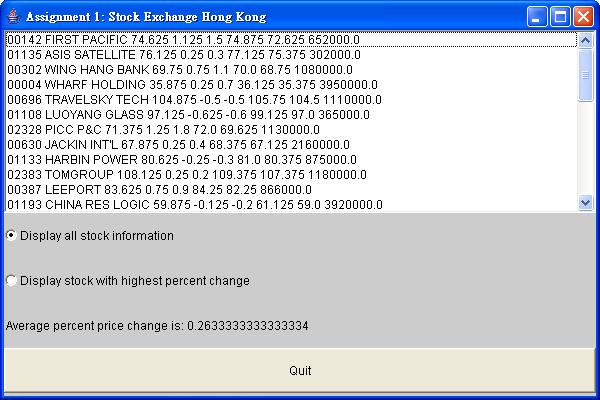
List component. The
user can then selectively view either all stock information or only the stock
with the highest price change by clicking the Checkbox components. The
average percent price change is also displayed in the user interface. To exit the
program, the user can click either the 'Quit' Button component or use
the program window's system menu.
The following is a screen shot of the program after a sample data file has been loaded.
The stock information is in the form of a text file hsistock.dat. It contains one line of information for each company represented. Each line contains the following information, in the order shown.
Breakdown Of A Stock Entry
String - the HKex symbol for the companyString - the name of the companydouble - the current price of one share of the company's stockdouble - the amount the company's stock price changed from its
previous valuedouble - the change in the company's stock price from its previous
value as a percent of the previous valuedouble - the highest price ever recorded for the company's stockdouble - the lowest price ever recorded for the company's stockdouble - the total volume (number of shares) of the company's
stock in existence_")
(since the company name may contain spaces, the space character could not
be used as the delimiter). A sample entry line follows.
Sample Stock Entry
00001_CHEUNG KONG_30.875_0.5_1.6_31.125_30.5_4010000.0_Description Of Sample Stock Entry
00001CHEUNG KONG30.8750.51.6 (indicates 1.6%)31.12530.54010000.0This assignment consists of three parts: class Stock, class StockDB,
and the graphical user interface (class HKexHSI). To effeciently complete
this assignment, you are encouraged to code and compile each class before moving on to the next class.
Stock [8 %]Stock. This
is the class that stores information for one company, i.e., information
from one line of the HKex information file. The class already
contains the declarations of eight instance variables which correspond
to the information described above in the list Breakdown Of A Stock
Entry.
Stock Instance Variables
First, complete the constructor. It accepts twoprivate String symbol; private String name; private double currPrice; private double delta; // change in price since previous value private double pctChange; // delta as a percent of previous value private double highestPrice; private double lowestPrice; private double volume;
String arguments.
The first is stockData. This is a String expected to
contain a line of information from the HKex information file.
This String must be parsed into the eight pieces of information
expected to exist in that line. Each piece must be appropriately stored
in the corresponding Stock instance variable. The instance variables
are shown above in Stock Instance Variables. If the parsing
fails, the constructor should throw StockFormatException,
providing stockData as an argument to the exception. The class
StockFormatException
is already implemented. The parsing should fail if stockData does
not contain exactly eight items each of the expected format. For example,
if a double was expected from the current token, and the token
could not be parsed to a double, StockFormatException
should be thrown.
The second argument to the Stock constructor is DELIM.
This is only used in the initialization of the local StringTokenizer
object. It is not needed elsewhere.
Once the constructor is completed, write accessor methods for the instance
variables of the class Stock. The accessor methods should be named
according to the convention getFieldname, where Fieldname
is the name, with its first letter capitalized, of the Stock field
being accessed. For example, the accessor method for the field volume
should be getVolume. Its prototype would be the following.
Write one for each of the eightpublic double getVolume();
Stock fields.
Finally, complete the method toString. It should return a String
representation of the Stock object. This representation should
contain the values of the eight fields of the Stock object, separated
(not led or terminated) by a single space. The String should not
contain newlines. The method toString should not access the instance
variables directly. It should make use of accessor methods.
This will complete the implementation of the class Stock.
StockDB [12 %]Next, complete the implementation of the class StockDB. The
class StockDB declares an array of Stock objects. As
is proper for any array, the capacity (maximum size) of the array and a
number indicating the number of elements the array actually stores (current
size) are also declared. These are the fields CAPACITY and size,
respectively. Do not change the value of CAPACITY.
The constructor needs to be implemented. The constructor should initialize
the StockDB object so that it is an empty array of Stock
objects with a capacity of CAPACITY.
Next, complete the accessor method get. The method get
should return the Stock object in the array located at the position
indicated by its parameter index. Do not check the parameter index
against the array bounds as ArrayIndexOutOfBoundsException will
be thrown by the Java environment if the value of index
is out of bounds.
Continue and complete the accessor methods capacity and size
which should return the value of the CAPACITY and the value of
the size, respectively.
Next, complete the mutator method add. The method add
should append (place in the first unused position) its Stock parameter
to the array. Do not check against the array bounds as ArrayIndexOutOfBoundsException
will be thrown by the Java environment if an out of bounds access
is attempted. The method add should always return true
indicating that the array has been modified.
Continue and complete the mutator method setSize. This should
set the value of the instance variable size to the value the parameter.
It should perform no error checking.
Once the accessors and mutators are complete, complete the method toString.
It should return a String representation of the StockDB
object by making use of the method toString of each Stock
object in the array. Each Stock object should be separated (not
led or terminated) by newlines in the resulting String. The method
toString
should not access the instance variables directly. It should make use of
accessor methods.
Finally, complete the method load. The method load
should read one line at a time from its BufferedReader parameter
br,
passing this line, along with the parameter DELIM, to the Stock
constructor to create a Stock object. As the Stock objects
are created, append them to the array. The method
load should
not access the instance variables directly.
This will complete the implementation of the class StockDB.
HKexHSI) [20 %]Lastly, finish the implementation of the class HKexHSI, a
class that defines the graphical user interface and extends java.awt.Frame.
First write the code that initializes the user interface components.
These components are all members of the Java AWT library, hence
libraries
java.awt.* and java.awt.event.* are
imported in class HKexHSI. Begin by declaring instance
variables for each component needed to build the GUI. The following
components must be defined:
List component to display the stock informationCheckbox component, when selected, fills the List component with all stocksCheckbox component, when selected, fills the List component with only the stock with the highest price change.CheckboxGroup component that groups the two Checkbox componentsLabel component which displays the average percent price changeButton component, when clicked, exits the program
Then, in method initComponents,
add each component (except the CheckboxGroup component) to the user interface. Use the appropriate layout manager
to achieve an interface similar to the sample program. Also in method
initComponents, set up event handlers to handle the user clicking
of the Button component, the state change of the Checkbox
components, and the closing of the program. This should be done by first adding a listener
to the appropriate component and then implementing code in the
ActionListener, ItemListener, and WindowListener interfaces.
The constructor for class HKexHSI is complete. Study this
code to gain a better understanding as to how the program functions.
Next, write the code for method load. This code opens and reads
stock information from the file specified by the fileName parameter.
While attempting
to open the file indicated by the parameter, FileNotFoundException
may be thrown. This must be handled so that the user is notified if this
occurs. Method load already handles the condition that the file contains
incorrectly formatted stock information. This is done by catching the
StockFormatException
exception. Method load also handles the condition that a data file contains
more stock entries than the StockDB object can hold. This is
done by catching the ArrayIndexOutOfBound exception.
Then, complete the implementation of method highestPriceChange.
That method should return the index of the Stock item that has
recorded the largest change, regardless of direction, in price, as kept
by the field delta. Finally, complete the method avgPctChange.
That method should return the average percent change in price, as indicated
by the field avgPctChange, across all Stock items in
the database.
Next, write the code that loads the List component with the
appropriate stock information. Begin by writing the code for method
displayAll, a routine which loads all stock information into the
List component. Then complete the implementation for method
displayHighest, a routine which loads the stock information for
the stock with the highest price change into the List component. Method
displayHighest must use method highestPriceChange to
determine which stock has the highest price change.
Prior to loading the List component in both method displayAll
and method
displayHighest, use method removeAll of the
List component to clear the contents of the List component.
Finally, write the code for method displayAverage. This method
must update the contents of the Label component that displays
the average percent price change. Method displayAverage must
use method avgPctChange to determine the average percent price change.
Commenting with Javadoc is required.
Notice: Do not modify, add to, or circumvent beyond what is specified in this description. A sample executable is provided. Your solution should behave identically to it, even if the sample executable appears to behave incorrectly. If you have questions concerning the description, run the sample executable to attempt to answer those questions.
StockFormatException.StockFormatException.Stock
belongs in this template.StockDB
belongs in this template.HKexHSI
belongs in this template.C:\>jar xf asgn1student.jarThen, run the sample executable and become familiar with its behavior. Be sure to run the sample executable using all four sample data files, hsistock.dat, badstockformat1.dat, badstockformat2.dat, and empty.dat.
C:\>java -jar asgn1exe.jar hsistock.datNext, compile any source files provided to ensure they contain no compilation errors.
C:\>javac HKexHSI.javaFinally, complete the homework. Work and test incrementally. Save often.
Upon completion, submit only the following.
For the assignment under consideration, the objectives/required outcomes are as follow. Those objectives underlined are essential objectives (90%) used to evaluate the performance of a student.
The Assignment is to be handed in the prescribed manner: