- Creat a working directory lab4 and download the source files from Lab Tutorial folder. Import all files into Eclipse.
- install dicttoxml and test run "filep9.py"
- Shift+Right-Click to start Windows PowerShell in the directory created
- type "pip install dicttoxml"
- type "python filep9.py"
- open "client.xml" with "Notepad" and your browser, explain the difference you see.
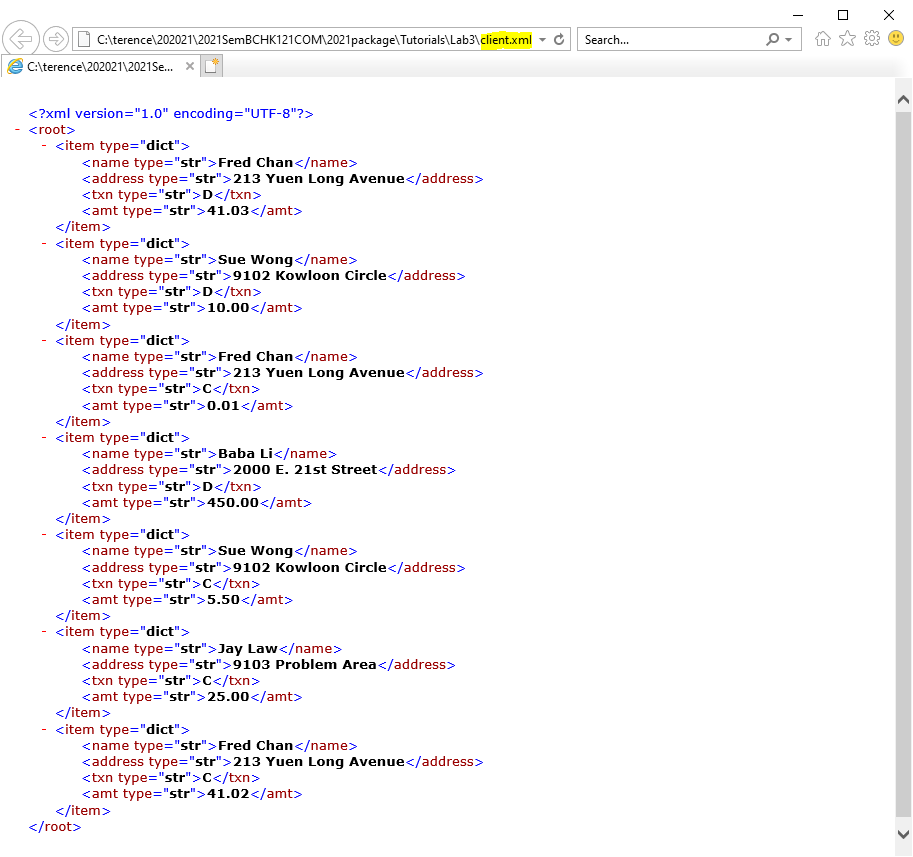
- install xmltodict, print data in JSON, and creat a list of dictionary from client.xml
- type "pip install xmltodict" in command prompt
- In Eclipse, copy and paste the following program to create a new module:
import xmltodict import json import urllib.request fileIn=urllib.request.urlopen('http://personal.cityu.edu.hk/~dcywchan/1718SemB121COM/client.xml') byteStr = fileIn.read() lines=byteStr.decode('utf-8') dl=xmltodict.parse(lines) print(json.dumps(dl,indent=4)) newdl=[] for e in dl['root']['item']: tmpdl={} for key,value in e.items(): if key != "@type": value=value["#text"] tmpdl.update({key:value}) newdl.append(tmpdl) #print out dictionary list created - complete the programe to see the dictionary list created
- Complete the Client class in your coursework.
Each instance of the class should have the attributes name, address and balance. The instantiation method should have input determining the customer name and address. It should also set the balance to zero.
In addition to constructor and __str__ method for output, each instance should have access to methods debit and credit to change the balance.
Test the class by rewriting SBapp program using a list to store and process Client objects with
the following features required:
- Make the balance a private attribute so that a user can only change it by going through the methods. Add an accessor method getBalance which a user can use to check their balance.
- Ensure that the debit method does not allow a user to pay back more money than their balance.
- Add an attribute number which keeps count of how many accounts have been created.
- To handle errors more efficiently, the constructor accepts one String argument instead of numbers of data elements. This String argument must be parsed into different pieces of information expected to exist in that line. Each piece must be appropriately stored in the corresponding Client instance variable. If the parsing fails, the constructor should throw ValueError Exception, providing type of error such as "invalid name" or "invalid transaction code" as an argument to the exception. The parsing should fail if the String argument does not contain the exact number of items and each items of the expected format. For example, if a float was expected from the current token, and the token could not be parsed into a float number, ValueError should be thrown and an error message should be displayed in the console.
- Given the Point classs (Point.py) in Lab4 folder, use Point to rewrite Lab 1, Part 5, Question 4. Add an distance() method to Point class for the area calculation.
- Add TriangleStar and Point classes to the shape package in Lab1 and rewrite Question 5 in Lab1.
- Download (i.e. Pull) the following repository from GitHub: https://github.com/SCOPEterenceChan/CHK121COMlab3q1SimpleBillingFromXML. Dissect and modify the code to add header, block, and inline comment to the program. After each modification, test if the program is running correctly and do version control in your local repository with Git.
- Given the above programs to process XML data. Write a program to use daily forex rate in XML format published by the European Central Bank (ECB). http://www.ecb.europa.eu/stats/eurofxref/eurofxref-daily.xml The program will prompt user for Currency Code and output today currency rate. For example, when user enters "CNY", the program will print "On 2018-02-20 3pm Central European Time, One euro is 7.8290 CNY (CHINA RENMINBI)" as output. Special drawing rights (XDR) is not an actual currency. However, it is used to define value for various purposes by organisations like the International Monetary Fund. It is defined as: 1 XDR = 0.423 Euros + 12.1 Japanese Yen + 0.111 British Pounds + 0.66 US Dollars. Your program should support XDR as a currency.